  try
        {
            SqlConnection con = new SqlConnection(strcon);
            con.Open();
            SqlCommand cmd = new SqlCommand("select * from main_menu", con);
            SqlDataAdapter ad = new SqlDataAdapter(cmd);
            DataTable dt = new DataTable();
            ad.Fill(dt);
            if (dt.Rows.Count > 0)
            {
                foreach (DataRow dr in dt.Rows)
                {
                    content += "<li><a href='" + dr["menu_url"] + "?pid=" + dr["id"] + "'" + ">" + dr["menu_name"] + "</a></li>";
                }
                nav.InnerHtml = content;
            }
            con.Close();
        }
        catch (Exception ex)
        {
            Response.Write(ex.Message);
        }
Wednesday, 26 November 2014
Asphelp: How To Show multiple Image in ul & li using database
Asphelp: How To Create Dynamic Div Using Sql Server As Database
 for (int i = 0; i < dt.Rows.Count; i++)
            {
                int pro_id = Convert.ToInt32(dt.Rows[i]["pro_id"].ToString());
                pro_name = dt.Rows[i]["pro_name"].ToString();
                pro_amount = dt.Rows[i]["pro_amount"].ToString();
                pro_image = dt.Rows[i]["pro_image"].ToString();
                string inputString = "Images/product/" + pro_image;
                HtmlGenericControl li = new HtmlGenericControl();
                li.TagName = "li";
                li.InnerHtml = "<a href=" + "view_detail.aspx?pid=" + pro_id + ">" + "<img src='" + inputString + "' width='" + "180" + "' height='" + "170" + "' runat='" + "Server" + "'s/>" + "</a><br />" + pro_name + "<br /> Rs. " + pro_amount + " PER KG";
                dynlatest.Controls.Add(li);
            }
Friday, 26 September 2014
Asphelp: Bind asp repeater with database
Download Source
In this article you will learn how to bind Sql server Table and show the record of table in asp repeater. Sql server used for database and visual studio for design and developing
Create Table
HTML CODE
C# CODE
Output Preview

Download Source
In this article you will learn how to bind Sql server Table and show the record of table in asp repeater. Sql server used for database and visual studio for design and developing
Create Table
CREATE TABLE [dbo].[employee] (
    [Id]   INT          IDENTITY (1, 1) NOT NULL,
    [name] VARCHAR (50) NULL,
    PRIMARY KEY CLUSTERED ([Id] ASC)
);
HTML CODE
<!DOCTYPE html>

<html xmlns="http://www.w3.org/1999/xhtml">
<head runat="server">
    <title></title>
    <style>
        #tbl1 {
            border: 3px #fff solid;
            padding: 10px;
            margin: 5px;
            width:400px;
            box-shadow: 3px 5px 15px #b6b6b6;
        }

            #tbl1:hover {
                border: #ffd926 3px solid;
                padding: 10px;
                margin: 5px;
                box-shadow: 3px 5px 15px #b6b6b6;
            }
    </style>
</head>
<body>
    <form id="form1" runat="server">
        <div align="center">
            <asp:Repeater ID="rptbind" runat="server">
                <ItemTemplate>
                    <table id="tbl1" style="background-color: white">
                        <tr>
                            <td>Employee ID : <%#Eval("id") %>
                            </td>
                            <td align="left">Employee Name : <%#Eval("name") %>
                            </td>
                        </tr>
                    </table>
                </ItemTemplate>
            </asp:Repeater>
        </div>
    </form>
</body>
</html>
C# CODE
using System;
using System.Collections.Generic;
using System.Linq;
using System.Web;
using System.Web.UI;
using System.Web.UI.WebControls;
using System.Data.SqlClient;
using System.Data;

namespace Datalist
{
    public partial class Home : System.Web.UI.Page
    {
        SqlConnection con = new SqlConnection("Data Source=Servername;Initial Catalog=Databasename;Integrated Security=True");

        protected void Page_Load(object sender, EventArgs e)
        {
            con.Open();
            SqlCommand cmd = new SqlCommand("select * from employee", con);
            SqlDataAdapter ad = new SqlDataAdapter(cmd);
            DataSet ds = new DataSet();
            ad.Fill(ds);
            rptbind.DataSource = ds.Tables[0];
            rptbind.DataBind();
            con.Close();
        }
    }
}
Output Preview

Download Source
Wednesday, 24 September 2014
Asphelp: Upload Image Add Watermark Then Download
Download Source
In this article you will learn how to upload image and show preview.there is a textbox which is used to add a watermark text in image.there is button which is used to download the watermark image. .mdf database is create in visual studio
HTML CODE
C# CODE
Output Preview

Download Source
In this article you will learn how to upload image and show preview.there is a textbox which is used to add a watermark text in image.there is button which is used to download the watermark image. .mdf database is create in visual studio
HTML CODE
<!DOCTYPE html>

<html xmlns="http://www.w3.org/1999/xhtml">
<head runat="server">
    <title></title>
    <link href="button.css" rel="stylesheet" />
</head>
<body>
    <form id="form1" runat="server">
        <div align="center" style="font-size: 20px;">
            Upload Image And Add Watermark Text
        </div>
        <br />
        <div>
            <table style="margin-left: 350px;">
                <tr>
                    <td>
                        <div style="margin-top:-140px;">
                            <asp:FileUpload ID="fupload" runat="server" />
                            <br />
                            <input id="btnupload" runat="server" type="submit" value="Upload" class="shiny-button" onserverclick="btnupload_ServerClick" />
                        </div>
                    </td>
                    <td>
                        <asp:Image ID="img1" runat="server" Width="300px" Height="180px" />
                        <br />
                        <br />
                        <input type="text" id="txtwatermark" runat="server" class="textbox" />
                        <br />
                        <br />
                        <input type="submit" id="btndownload" runat="server" value="Download Image" class="shiny-button" onserverclick="btndownload_ServerClick" />
                    </td>
                </tr>
            </table>
        </div>
    </form>
</body>
</html>
C# CODE
using System;
using System.Collections.Generic;
using System.Linq;
using System.Web;
using System.Web.UI;
using System.Web.UI.WebControls;
using System.IO;
using System.Drawing;

namespace WatermarkImage
{
    public partial class Home : System.Web.UI.Page
    {
        public static string filename;

        protected void Page_Load(object sender, EventArgs e)
        {

        }

        protected void btnupload_ServerClick(object sender, EventArgs e)
        {
            if (fupload.HasFile)    //uploading file
            {
                filename = Path.GetFileName(fupload.PostedFile.FileName);
                fupload.SaveAs(Server.MapPath("~/Upload/" + filename));   //save image in upload folder
                img1.ImageUrl = "~/Upload/" + filename;
            }
        }

        protected void btndownload_ServerClick(object sender, EventArgs e)
        {
            string fileName;
            int num;
            Random obj = new Random();      //random number genrate
            num = obj.Next(0, 1000000);
            fileName = (num + ".jpg");
            System.Drawing.Image upImage = System.Drawing.Image.FromFile(Server.MapPath(img1.ImageUrl));
            using (System.Drawing.Graphics g = Graphics.FromImage(upImage))
            {
                int opacity = 120;              //show text to image
                SolidBrush brush = new SolidBrush(Color.FromArgb(opacity, Color.Black));
                Font font = new Font("Calibri", 50);
                g.DrawString(txtwatermark.Value, font, brush, new PointF(8, 15));
                upImage.Save(Path.Combine(Server.MapPath("~\\Download\\" + fileName)));
                g.Dispose();
                brush.Dispose();
                font.Dispose();
            }
            upImage.Dispose();
            Response.Clear();       //download image from download folder
            Response.ContentType = "Application/jpg";
            Response.AddHeader("Content-Disposition", "attachment; filename=" + fileName + "");
            Response.TransmitFile("~\\Download\\" + fileName);
            Response.Flush();
        }
    }
}
Output Preview

Download Source
Tuesday, 23 September 2014
Asphelp: Cookies Add To Cart Asp.net C#
Download Source
In previous post we show you how to create add to cart using session. In this article you will learn how to create add to cart using cookies. accept all the details from user before add to cart in not necessary.
Create Table Product

HTML Homepage
C# Hompage
Cart Page HTML
Cart Page C#
Output Preview

Download Source
In previous post we show you how to create add to cart using session. In this article you will learn how to create add to cart using cookies. accept all the details from user before add to cart in not necessary.
Create Table Product

HTML Homepage
<!DOCTYPE html>
<html xmlns="http://www.w3.org/1999/xhtml">
<head runat="server">
<title></title>
<link href="assets/css/styles.css" rel="stylesheet" />
<link href="assets/css/button.css" rel="stylesheet" />
<style>
#tbl1 {
border: 3px #fff solid;
padding: 10px;
margin: 5px;
min-height: 300px;
min-width: 230px;
box-shadow: 3px 5px 15px #b6b6b6;
}
#tbl1:hover {
border: #ffd926 3px solid;
padding: 10px;
margin: 5px;
min-height: 300px;
min-width: 230px;
box-shadow: 3px 5px 15px #b6b6b6;
}
#output {
float: right;
border: groove;
width: 315px;
margin: 11px;
box-shadow: 3px 5px 15px #b6b6b6;
}
</style>
</head>
<body style="background-color: #F7F5EE">
<form id="form1" runat="server">
<asp:UpdatePanel ID="UpdatePanel1" runat="server">
<ContentTemplate>
<asp:ScriptManager ID="ScriptManager1" runat="server"></asp:ScriptManager>
<div>
<div style="float: right; margin-right: 50px;">
<input type="submit" runat="server" id="btncart" value="View Cart" class="shiny-button" onserverclick="btncart_ServerClick" />
<asp:Label ID="lblcount" runat="server" Font-Size="Large"></asp:Label>
</div>
<table>
<tr>
<td>
<img id="img2" runat="server" width="300" src="~/image/shoplogo.png" /></td>
</tr>
</table>
</div>
</ContentTemplate>
</asp:UpdatePanel>
<div style="float: left; margin-left: 150px;">
<asp:UpdatePanel ID="UpdatePanel2" runat="server">
<ContentTemplate>
<br />
<asp:DataList ID="Datalist1" runat="server" RepeatDirection="Horizontal" RepeatColumns="4" OnItemCommand="Datalist1_ItemCommand">
<ItemTemplate>
<table id="tbl1" style="background-color: white">
<tr style="height: 10%;">
<td style="text-align: center;" colspan="2"><b>
<asp:Label ID="lblname" Font-Size="22px" runat="server" Text='<%#Eval("ProductName") %>'></asp:Label></b><hr />
</td>
</tr>
<tr>
<td colspan="2" style="height: 80%;">
<img id="img1" class="img1" runat="server" src='<%#Eval("ProductImage") %>' /></td>
<td></td>
</tr>
<tr style="height: 10%;">
<td>Rs:<asp:Label ID="lblprice" runat="server" Text='<%#Eval("Amount") %>'></asp:Label></td>
<td>
<input type="hidden" id="hiddenid" value='<%# DataBinder.Eval(Container.DataItem, "ProductID") %>' runat="server" />
<input type="hidden" id="hiddenname" value='<%# DataBinder.Eval(Container.DataItem, "ProductName") %>' runat="server" />
<input type="hidden" id="hiddenamount" value='<%# DataBinder.Eval(Container.DataItem, "Amount") %>' runat="server" />
<input type="hidden" id="hiddenimg" value='<%# DataBinder.Eval(Container.DataItem, "ProductImage") %>' runat="server" />
<asp:Button ID="btnwishlist" runat="server" Text="Add To cart" CommandName="Add" CssClass="shiny-button" /></td>
</tr>
</table>
</ItemTemplate>
</asp:DataList>
</ContentTemplate>
</asp:UpdatePanel>
</div>
</form>
</body>
</html>
C# Hompage
using System;
using System.Collections.Generic;
using System.Linq;
using System.Web;
using System.Web.UI;
using System.Web.UI.WebControls;
using System.Data.SqlClient;
using System.Data;
using System.Configuration;
using System.Web.UI.HtmlControls;
using System.Collections;

namespace CookiesAddToCart
{
    public partial class Home : System.Web.UI.Page
    {
        protected void Page_Load(object sender, EventArgs e)
        {
            if (!Page.IsPostBack)
            {
                Binddata();
                count();
            }
        }

        private void Binddata()
        {
            SqlConnection con = new SqlConnection("Data Source=Servername;Initial Catalog=databasename;Integrated Security=True");
            con.Open();
            SqlDataAdapter da = new SqlDataAdapter("select * from Product", con);
            DataSet ds = new DataSet();
            da.Fill(ds, "Product");
            Datalist1.DataSource = ds;
            Datalist1.DataBind();
        }

        public void count()
        {
            if (Request.Cookies["ShoppingCart"] != null)
            {
                var value = Request.Cookies["ShoppingCart"].Values.Count;
                lblcount.Text = value.ToString();
            }
            else
            {
                var value = "0";
                lblcount.Text = value.ToString();
            }
        }

        protected void Datalist1_ItemCommand(object source, DataListCommandEventArgs e)
        {
            if (e.CommandName == "Add")
            {
                string id = ((HtmlInputHidden)e.Item.FindControl("hiddenid")).Value;
                string name = ((HtmlInputHidden)e.Item.FindControl("hiddenname")).Value;
                string amount = ((HtmlInputHidden)e.Item.FindControl("hiddenamount")).Value;
                string image = ((HtmlInputHidden)e.Item.FindControl("hiddenimg")).Value;

                HttpCookie c = null;
                if (HttpContext.Current.Request.Cookies["ShoppingCart"] == null)
                    c = new HttpCookie("ShoppingCart");
                else
                    c = HttpContext.Current.Request.Cookies["ShoppingCart"];
                string itemdetails;
               itemdetails = id + "|" + name + "|" + amount + "|" + image;
                c.Values[id] = itemdetails;
                c.Expires = DateTime.Now.AddDays(2);
                Response.Cookies.Add(c);
                Response.Redirect(Request.RawUrl);
            }
        }

        protected void btncart_ServerClick(object sender, EventArgs e)
        {
            HttpCookie myCookie = new HttpCookie("ShoppingCart");
            myCookie = Request.Cookies["ShoppingCart"];
            if (myCookie != null)
                Response.Redirect("Cart.aspx");
            else
                Response.Cookies["ShoppingCart"].Expires = DateTime.Now.AddDays(-1);
        }
    }
}
Cart Page HTML
<!DOCTYPE html>

<html xmlns="http://www.w3.org/1999/xhtml">
<head runat="server">
    <title></title>
    <link href="assets/css/button.css" rel="stylesheet" />
    <style>
        #output {
            border: groove;
            width: 480px;
            box-shadow: 3px 5px 15px #b6b6b6;
            border-radius: 13px 13px 13px 13px;
            background-color: white;
            margin:0px auto;
            margin-top:65px;
        }
    </style>
</head>
<body style="background-color: #F7F5EE">
    <form id="form1" runat="server">
        <asp:ScriptManager runat="server"></asp:ScriptManager>
        <div id="output">
            <asp:UpdatePanel ID="UpdatePanel1" runat="server">
                <ContentTemplate>
                    <table>
                        <tr>
                            <td>
                                <img src="image/cart.png" width="45" height="45" /></td>
                            <td>
                                <asp:Label ID="lblcount" runat="server" Font-Size="X-Large"></asp:Label></td>
                        </tr>
                    </table>
                </ContentTemplate>
            </asp:UpdatePanel>
            <hr />
            <div style="border-bottom: groove 1px; min-height: 220px;">
                <asp:UpdatePanel ID="UpdatePanel2" runat="server">
                    <ContentTemplate>
                        <asp:Repeater ID="rptcart" runat="server" OnItemCommand="rptcart_ItemCommand">
                            <ItemTemplate>
                                <table style="width: 100%">
                                    <tr>
                                        <td style="width: 20%">
                                            <asp:Label ID="lblid" runat="server" Text='<%#Eval("ProductID") %>'></asp:Label></td>
                                        <td style="width: 20%">
                                            <img id="img1" class="img1" runat="server" width="40" height="40" src='<%#Eval("ProductImage") %>' /></td>
                                        <td style="width: 20%">
                                            <asp:Label ID="lblqty" runat="server" Text='<%#Eval("ProductName") %>'></asp:Label></td>
                                        <td style="width: 20%">
                                            <asp:Label ID="lblprice" runat="server" Text='<%#Eval("Amount") %>'></asp:Label></td>
                                        <td style="width: 20%">
                                            <asp:TextBox ID="TextBox2" runat="server" Text='<%# DataBinder.Eval(Container.DataItem, "quantity") %>' Columns="3"></asp:TextBox>
                                            <asp:LinkButton ID="saveqty" runat="server" Font-Size="12px" CommandName="countqty" OnClick="saveqty_Click">Save</asp:LinkButton>
                                        </td>
                                        <td>
                                            <input type="hidden" id="hiddenid" value='<%# DataBinder.Eval(Container.DataItem, "ProductID") %>' runat="server" />
                                            <input type="hidden" id="hiddenqty" value='<%# DataBinder.Eval(Container.DataItem, "quantity") %>' runat="server" />
                                            <input type="hidden" id="hiddenamount" value='<%# DataBinder.Eval(Container.DataItem, "Amount") %>' runat="server" />
                                            <asp:ImageButton CommandName="delete" ID="btndelete" runat="server" ImageUrl="~/image/close.png" CommandArgument='<%#Eval("ProductID") %>' Width="15" Height="15" />
                                        </td>
                                    </tr>
                                </table>
                            </ItemTemplate>
                        </asp:Repeater>
                    </ContentTemplate>
                </asp:UpdatePanel>
            </div>
            <div style="height: 125px;">
                <asp:UpdatePanel ID="UpdatePanel3" runat="server">
                    <ContentTemplate>
                        <table width="98%">
                            <tr>
                                <td style="text-align: center; width: 50%">
                                    <br />
                                    <b style="font-size: 15px">Estimated Total : </b>
                                    <b>
                                        <asp:Label ID="lbltotalamt" runat="server" Font-Size="15px"></asp:Label></b></td>
                            </tr>
                            <tr>
                                <td style="text-align: center; width: 50%;">
                                    <br />
                                    <input type="submit" id="btnempty" runat="server" style="font-size: 15px" value="Clear Cart" class="shiny-button" /></td>
                                <td style="text-align: center; width: 50%">
                                    <br />
                                    <input type="submit" id="btnproceed" runat="server" style="font-size: 15px" value="Place Order" class="shiny-button" /></td>
                            </tr>
                        </table>
                    </ContentTemplate>
                </asp:UpdatePanel>
            </div>
        </div>
    </form>
</body>
</html>
Cart Page C#
using System;
using System.Collections;
using System.ComponentModel;
using System.Data;
using System.Drawing;
using System.Web;
using System.Web.SessionState;
using System.Web.UI;
using System.Web.UI.WebControls;
using System.Web.UI.HtmlControls;

namespace CookiesAddToCart
{
    public partial class Cart : System.Web.UI.Page
    {
        protected void Page_Load(object sender, EventArgs e)
        {
            if (!Page.IsPostBack)
            {
                FillCartFromCookies();
            }
        }

        private void FillCartFromCookies()
        {
            if (Request.Cookies["ShoppingCart"] != null)
            {
                HttpCookie c = HttpContext.Current.Request.Cookies["ShoppingCart"];
                ArrayList items = new ArrayList();

                for (int i = 0; i < c.Values.Count; i++)
                {
                   string[] vals = c.Values[i].Split('|');
                    shopdetail item = new shopdetail();
                    item.ProductID = int.Parse(vals[0]);
                    item.ProductName = vals[1];
                    item.Amount = decimal.Parse(vals[2]);
                    item.ProductImage = vals[3];
                    item.Quantity = 1;
                    items.Add(item);
                }

                rptcart.DataSource = items;
                rptcart.DataBind();
                saveqty_Click(null, null);

            }
            else
            {
                Response.Redirect("Home.aspx");
            }
        }

        protected void rptcart_ItemCommand(object source, RepeaterCommandEventArgs e)
        {
            if (e.CommandName == "delete")
            {
                string id = ((HtmlInputHidden)e.Item.FindControl("hiddenid")).Value;
                HttpCookie c = HttpContext.Current.Request.Cookies["ShoppingCart"];
                c.Values.Remove(id);
                Response.Cookies.Add(c);
                FillCartFromCookies();
                if (Request.Cookies["ShoppingCart"] != null)
                {
                    var value = Request.Cookies["ShoppingCart"].Value;
                    if (value == "")
                    {
                        Response.Cookies["ShoppingCart"].Expires = DateTime.Now.AddDays(-1);
                    }
                }
            }
        }

        protected void saveqty_Click(object sender, EventArgs e)
        {
            decimal total = 0;
            try
            {
                foreach (RepeaterItem rpt in rptcart.Items)
                {

                    if (rpt.ItemType == ListItemType.Item || rpt.ItemType == ListItemType.AlternatingItem)
                    {
                        TextBox t = (TextBox)rpt.FindControl("TextBox2");
                        Label l = (Label)rpt.FindControl("lblprice");
                        int quantity = int.Parse(t.Text);
                        decimal unitprice = Decimal.Parse(l.Text);
                        total = total + (unitprice * quantity);
                    }
                }
            }
            catch
            {
            }

            lbltotalamt.Text = total.ToString();
        }
    }
}
Output Preview

Download Source
Friday, 19 September 2014
Asphelp: Cascade Dropdownlist Using C#
Download Source
In this article you will learn how to make cascading dropdownlist.
Create Table Automobile
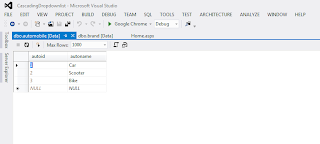
Create Table Brand

Create Table Model

HTML CODE
C# CODE
Output Preview

Download Source
In this article you will learn how to make cascading dropdownlist.
Create Table Automobile

Create Table Brand

Create Table Model

HTML CODE
<!DOCTYPE html>

<html xmlns="http://www.w3.org/1999/xhtml">
<head runat="server">
    <title></title>
    <style>
        .textbox {
            background: white;
            border: 1px double #DDD;
            border-radius: 5px;
            box-shadow: 0 0 5px #333;
            color: #666;
            outline: none;
            height: 25px;
            width: 230px;
        }
    </style>

</head>
<body style="background-color: #F5FAFA">
    <form id="form1" runat="server">
        <div align="center">
            <asp:ScriptManager runat="server"></asp:ScriptManager>
            <asp:UpdatePanel runat="server">
                <ContentTemplate>
                    <table>
                        <tr>
                            <td align="center" style="font-size: large">Cascading Dropdown list<br />
                                <br />
                            </td>
                        </tr>
                        <tr>
                            <td>
                                <asp:DropDownList ID="ddlautomobile" runat="server" CssClass="textbox" AutoPostBack="true" OnSelectedIndexChanged="ddlautomobile_SelectedIndexChanged" Font-Size="Medium"></asp:DropDownList><br />
                                <br />
                            </td>
                        </tr>
                        <tr>
                            <td>
                                <asp:DropDownList ID="ddlbrand" runat="server" CssClass="textbox" OnSelectedIndexChanged="ddlbrand_SelectedIndexChanged" AutoPostBack="true" Font-Size="Medium"></asp:DropDownList><br />
                                <br />
                            </td>
                        </tr>
                        <tr>
                            <td>
                                <asp:DropDownList ID="ddlmodel" runat="server" CssClass="textbox" Font-Size="Medium"></asp:DropDownList></td>
                        </tr>
                    </table>
                </ContentTemplate>
            </asp:UpdatePanel>
        </div>
    </form>
</body>
</html>
C# CODE
using System;
using System.Collections.Generic;
using System.Linq;
using System.Web;
using System.Web.UI;
using System.Web.UI.WebControls;
using System.Data.SqlClient;
using System.Data;
using System.Configuration;

namespace CascadingDropdownlist
{
    public partial class Home : System.Web.UI.Page
    {
        SqlConnection con = new SqlConnection("Data Source=Servername;Initial Catalog=Databasename;Integrated Security=True");

        protected void Page_Load(object sender, EventArgs e)
        {
            if (!IsPostBack)
            {
                bindautomobile();
                ddlbrand.Items.Insert(0, new ListItem("--------------   Select   --------------", "0"));
                ddlmodel.Items.Insert(0, new ListItem("--------------   Select   --------------", "0"));
            }
        }

        public void bindautomobile()
        {
            con.Open();
            SqlCommand cmd = new SqlCommand("Select * from automobile", con);
            SqlDataAdapter ad = new SqlDataAdapter(cmd);
            DataSet ds = new DataSet();
            ad.Fill(ds);
            ddlautomobile.DataSource = ds.Tables[0];
            ddlautomobile.DataValueField = "autoid";
            ddlautomobile.DataTextField = "autoname";
            ddlautomobile.DataBind();
            ddlautomobile.Items.Insert(0, new ListItem("--------------   Select   --------------", "0"));
        }

        protected void ddlautomobile_SelectedIndexChanged(object sender, EventArgs e)
        {
            con.Open();
            SqlCommand cmd = new SqlCommand("Select * from brand where autoid='" + ddlautomobile.SelectedItem.Value + "'", con);
            SqlDataAdapter ad = new SqlDataAdapter(cmd);
            DataSet ds = new DataSet();
            ad.Fill(ds);
            ddlbrand.DataSource = ds.Tables[0];
            ddlbrand.DataValueField = "brandid";
            ddlbrand.DataTextField = "brandname";
            ddlbrand.DataBind();
            ddlbrand.Items.Insert(0, new ListItem("--------------   Select   --------------", "0"));
        }

        protected void ddlbrand_SelectedIndexChanged(object sender, EventArgs e)
        {
            con.Open();
            SqlCommand cmd = new SqlCommand("Select * from model where brandid='" + ddlbrand.SelectedItem.Value + "'", con);
            SqlDataAdapter ad = new SqlDataAdapter(cmd);
            DataSet ds = new DataSet();
            ad.Fill(ds);
            ddlmodel.DataSource = ds.Tables[0];
            ddlmodel.DataValueField = "modelid";
            ddlmodel.DataTextField = "modelname";
            ddlmodel.DataBind();
            ddlmodel.Items.Insert(0, new ListItem("--------------   Select   --------------", "0"));
        }
    }
}
Output Preview

Download Source
Thursday, 18 September 2014
Wednesday, 17 September 2014
Asphelp: Dynamic Image With Zoom Effect
Download Source
In this article you will learn how to call image and show with zoom effect.
Create Table

HTML Code
C# Code
Output Preview

Download Source
In this article you will learn how to call image and show with zoom effect.
Create Table

HTML Code
<!DOCTYPE html>

<html>
<head runat="server">
    <title></title>
    <script type="text/javascript" src="images/jquery.min.js"></script>
    <link href="images/cloud-zoom.css" rel="stylesheet" type="text/css" />
    <script type="text/javascript" src="images/cloud-zoom.1.0.2.js"></script>
    <link href="images/main.css" rel="stylesheet" type="text/css" />
</head>
<body>
    <div align="center" style="font-size: x-large">Dynamic Image From Database With Zoom Effect</div>
    <br />
    <br />
    <div class="zoom-small-image" style="">
        <a runat="server" class='cloud-zoom' id='zoom1' rel="adjustX: 10, adjustY:-4">
            <img id="imgmain" runat="server" style="height: 320px; border: groove; width: 240px; overflow: hidden" /></a>
    </div>
    <div class="zoom-desc">
        <p>
            <a href="images/<%=href1 %>" class='cloud-zoom-gallery' rel="useZoom: 'zoom1', smallImage: 'images/<%=path1%>' ">
                <img id="img1" runat="server" class="zoom-tiny-image" alt="Thumbnail 1" width="48" height="64" style="border: groove;" /></a>

            <a href="images/<%=href2 %>" class='cloud-zoom-gallery' rel="useZoom: 'zoom1', smallImage: 'images/<%=path2%>' ">
                <img id="img2" runat="server" alt="Thumbnail 2" border="0" class="zoom-tiny-image" width="48" height="64" style="border: groove;" /></a>

            <a href="images/<%=href3 %>" class='cloud-zoom-gallery' rel="useZoom: 'zoom1', smallImage: 'images/<%=path3%>' ">
                <img id="img3" runat="server" alt="Thumbnail 3" border="0" class="zoom-tiny-image" width="48" height="64" style="border: groove;" /></a>
        </p>
    </div>
</body>
</html>
C# Code
using System;
using System.Collections.Generic;
using System.Linq;
using System.Web;
using System.Web.UI;
using System.Web.UI.WebControls;
using System.Data.SqlClient;
using System.Data;
using System.Configuration;

namespace Dynamic_Image
{
    public partial class Home_page : System.Web.UI.Page
    {
        public string path1;
        public string path2;
        public string path3;
        public string href1;
        public string href2;
        public string href3;
        SqlConnection con = new SqlConnection("Data Source=Servername;Initial Catalog=Databasename;Integrated Security=True");

        protected void Page_Load(object sender, EventArgs e)
        {
            bindimage();
        }

        public void bindimage()
        {
            con.Open();
            SqlCommand cmd = new SqlCommand("select * from imgdetails", con);
            SqlDataReader dr = cmd.ExecuteReader();
            while (dr.Read())
            {
                path1 = dr[1].ToString();       //For Pass Value In Anchortag
                path2 = dr[2].ToString();
                path3 = dr[3].ToString();

                zoom1.HRef = "images/" + dr[1].ToString();          //Call Tiny Image
                imgmain.Src = "images/" + dr[1].ToString();

                href1 = dr[1].ToString();
                img1.Src = "images/" + dr[1].ToString();            //Call Tiny Image

                href2 = dr[2].ToString();
                img2.Src = "images/" + dr[2].ToString();            //Call Tiny Image

                href3 = dr[3].ToString();
                img3.Src = "images/" + dr[3].ToString();
            }
            dr.Dispose();
        }
    }
}
Output Preview

Download Source
Asphelp: Insert Into Database Without Page Refresh
Download Source
In this article you will learn how to insert data without refreshing page jquery is used.
Create Table

HTML Code
C# Code
Output Preview

Download Source
In this article you will learn how to insert data without refreshing page jquery is used.
Create Table

HTML Code
<!DOCTYPE html>

<html xmlns="http://www.w3.org/1999/xhtml">
<head runat="server">
    <title></title>
    <script type="text/javascript" src="JS/JavaScript1.js"></script>
    <script type="text/javascript">
        $(document).ready(function () {
            $('#btninsert').click(function () {
                var name = $('#txtname').val();
                var age = $('#txtage').val();
                var address = $('#txtaddress').val();
                var contact = $('#txtcontact').val();
                $.ajax({
                    type: 'POST',
                    contentType: "application/json; charset=utf-8",
                    url: 'Home.aspx/Insertrecord',
                    data: "{'name':'" + name + "','age':'" + age + "','address':'" + address + "','contact':'" + contact + "'}",

                    success: function (response) {
                        $('#txtname').val(''); $('#txtage').val(''); $('#txtaddress').val(''); $('#txtcontact').val('');
                    },
                    error: function () {
                        alert("Error");
                    }
                });
            });
        });
    </script>
</head>
<body style="background-color:#eee">
    <form id="form1" runat="server">
        <div align="center" style="font-size:x-large">Insert Without Page Refresh</div>
        <br />
        <br />
        <div>
            <table align="center">
                <tr>
                    <td style="font-size:large">Name  </td>
                    <td>
                        <input type="text" id="txtname" runat="server" />
                    </td>
                </tr>
                <tr>
                    <td style="font-size:large">Age  </td>
                    <td>
                        <input type="text" id="txtage" runat="server" />
                    </td>
                </tr>
                <tr>
                    <td style="font-size:large">Address </td>
                    <td>
                        <input type="text" id="txtaddress" runat="server" />
                    </td>
                </tr>
                <tr>
                    <td style="font-size:large">Contact </td>
                    <td>
                        <input type="text" id="txtcontact" runat="server" />
                    </td>
                </tr>
                <tr>
                    <td></td>
                    <td>
                        <input type="button" id="btninsert" value="Insert" /></td>
                </tr>
            </table>
        </div>
    </form>
</body>
</html>
C# Code
using System;
using System.Collections.Generic;
using System.Linq;
using System.Web;
using System.Web.UI;
using System.Web.UI.WebControls;
using System.Data.SqlClient;
using System.Data;
using System.Configuration;
using System.Web.Services;

namespace Insertwithout_refresh
{
    public partial class Home : System.Web.UI.Page
    {
        protected void Page_Load(object sender, EventArgs e)
        {

        }

        [WebMethod]
        public static string Insertrecord(string name, string age, string address, string contact)
        {
            SqlConnection conn = new SqlConnection("Data Source=Servername;Initial Catalog=Databasename;Integrated Security=True");
            try
            {
                conn.Open();
                SqlCommand cmd = new SqlCommand("Insert into empdetail (name,age,address,contact) values(@name,@age,@address,@contact)", conn);
                cmd.CommandType = CommandType.Text;
                cmd.Parameters.AddWithValue("@name", name);
                cmd.Parameters.AddWithValue("@age", age);
                cmd.Parameters.AddWithValue("@address", address);
                cmd.Parameters.AddWithValue("@contact", contact);
                cmd.ExecuteNonQuery();
                conn.Close();
                return "Insertmsg";
            }
            catch (Exception ex)
            {
                return "Failuremsg";
            }
        }
    }
}
Output Preview

Download Source
Tuesday, 16 September 2014
Asphelp: Dynamic Menu With Admin Panel
Download Source
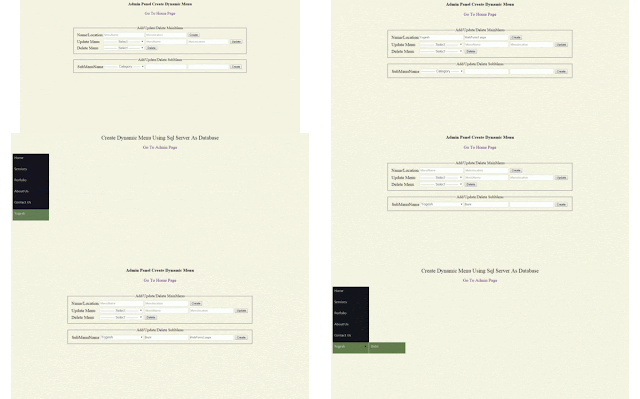
In this article you will learn how to make dynamic menu. admin panel is also used which provide the facility to add or remove menu or submenu.
Create Table

Design HomePage

HTML HomePage
C# homepage
HTML Design AdminPage

HTML Adminpage
C# AdminPage
Output Preview
Download Source
In this article you will learn how to make dynamic menu. admin panel is also used which provide the facility to add or remove menu or submenu.
Create Table

Design HomePage

HTML HomePage
<!DOCTYPE html>

<html xmlns="http://www.w3.org/1999/xhtml">
<head runat="server">
    <title></title>
    <style>
        #menu li {
            text-decoration: none;
            display: block;
            width: 150px;
            height:35px;
            font-family: Calibri;
            font-size: 17px;
            background-color: #131414;
            padding: 8px;
            margin-bottom: 0px;
            margin-left:1px;
        }

            #menu li:hover {
                background: rgba(98,125,77,1);
                background: -moz-linear-gradient(top, rgba(98,125,77,1) 95%,
                rgba(98,125,77,1) 98%, rgba(31,59,8,1) 100%);
                background: -webkit-gradient(left top, left bottom,
                color-stop(95%, rgba(98,125,77,1)),
                color-stop(98%, rgba(98,125,77,1)), color-stop(100%,
                rgba(31,59,8,1)));
                background: -webkit-linear-gradient(top, rgba(98,125,77,1) 95%,
                rgba(98,125,77,1) 98%, rgba(31,59,8,1) 100%);
                background: -o-linear-gradient(top, rgba(98,125,77,1) 95%,
                rgba(98,125,77,1) 98%, rgba(31,59,8,1) 100%);
                background: -ms-linear-gradient(top, rgba(98,125,77,1) 95%,
                rgba(98,125,77,1) 98%, rgba(31,59,8,1) 100%);
                background: linear-gradient(to bottom, rgba(98,125,77,1) 95%,
                rgba(98,125,77,1) 98%, rgba(31,59,8,1) 100%);
                filter: progid:DXImageTransform.Microsoft.gradient(
                startColorstr='#627d4d',endColorstr='#1f3b08',
                GradientType=0 );
            }
    </style>
</head>
<body style="background-color:#f5f4e3">
    <form id="form1" runat="server">
        <div align="center" style="font-size:25px;">
         Create Dynamic Menu Using Sql Server As Database</div>
        <br />
        <div align="center" style="font-size:20px"><a href="admin_page.aspx" style="text-decoration:none">Go To Admin Page</a></div>
        <br />
        <asp:Menu ID="menu" runat="server" Orientation="Vertical" ForeColor="#cccccc">
        </asp:Menu>
    </form>
</body>
</html>
C# homepage
using System;
using System.Collections.Generic;
using System.Linq;
using System.Web;
using System.Web.UI;
using System.Web.UI.WebControls;
using System.Data.SqlClient;
using System.Data;
using System.Configuration;

namespace Dynamic_Menu
{
    public partial class Home_page : System.Web.UI.Page
    {
        SqlConnection con = new SqlConnection("Data Source=Servername;Initial Catalog=Databasename;Integrated Security=True");
        DataSet ds = new DataSet();
        DataTable dt = new DataTable();

        protected void Page_Load(object sender, EventArgs e)
        {
            bindmenuitems();
        }

        public void bindmenuitems()
        {
            con.Open();
            SqlDataAdapter ad = new SqlDataAdapter("select * from menudetail", con);
            ad.Fill(ds);
            dt = ds.Tables[0];
            DataRow[] drowpar = dt.Select("parentid=" + 0);

            foreach (DataRow dr in drowpar)
            {
                menu.Items.Add(new MenuItem(dr["m_name"].ToString(),dr["id"].ToString(), "", dr["m_location"].ToString()));
            }

            foreach (DataRow dr in dt.Select("parentid >" + 0))
            {
                MenuItem menuitem = new MenuItem(dr["m_name"].ToString(),dr["id"].ToString(),"", dr["m_location"].ToString());
                menu.FindItem(dr["parentid"].ToString()).ChildItems.Add(menuitem);
            }
            con.Close();
        }
    }
}
HTML Design AdminPage

HTML Adminpage
<!DOCTYPE html>
<html xmlns="http://www.w3.org/1999/xhtml">
<head runat="server">
<title></title>
<link href="css/button.css" rel="stylesheet" />
<style type="text/css">
.font-style {
font-family: Aldrich;
color: #000000;
font-size: 20px;
padding: 0;
}
.textbox {
background: white;
border: 1px solid #DDD;
border-radius: 5px;
box-shadow: 0 0 5px #DDD inset;
color: #666;
outline: none;
height: 25px;
width: 200px;
}
</style>
</head>
<body style="background-color:#f5f4e3">
<div align="center" style="font-size:20px"><b>Admin Panel Create Dynamic Menu</b><br /><a href="Home_page.aspx" style="text-decoration:none"><br />Go To Home Page</a></div>
<div align="center" style="margin-top:50px;">
<form id="form1" runat="server">
<asp:Panel ID="pnlMainMenu" runat="server" GroupingText="Add/Update/Delete MainMenu"
Font-Size="Large" Width="850px">
<table>
<tr>
<td class="font-style">Name/Location</td>
<td>
<input type="text" id="txtmainmenu" runat="server" class="textbox" placeholder=" MenuName" /><br />
</td>
<td>
<input type="text" id="txtmainmenulocation" runat="server" class="textbox" placeholder=" Menulocation" /><br />
</td>
<td>
<input type="submit" id="btn_create_mainmenu" runat="server" class="css_button" value="Create" onserverclick="btn_create_mainmenu_ServerClick" /><br />
</td>
</tr>
<tr>
<td class="font-style">Update Menu</td>
<td>
<asp:ScriptManager ID="ScriptManager1" runat="server"></asp:ScriptManager>
<asp:UpdatePanel ID="UpdatePanel1" runat="server">
<ContentTemplate>
<asp:DropDownList ID="dllmainmenu" runat="server" AutoPostBack="True" CssClass="textbox" Font-Size="Medium"></asp:DropDownList>
</ContentTemplate>
</asp:UpdatePanel>
</td>
<td>
<input type="text" id="txtupdatemenu" runat="server" class="textbox" placeholder=" MenuName" /></td>
<td>
<input type="text" id="txtupdatelocation" runat="server" class="textbox" placeholder=" Menulocation" /></td>
<td>
<input type="submit" id="btn_update_mainmenu" runat="server" value="Update" class="css_button" onserverclick="btn_update_mainmenu_ServerClick" /></td>
</tr>
<tr>
<td class="font-style">Delete Menu</td>
<td>
<asp:UpdatePanel ID="UpdatePanel2" runat="server">
<ContentTemplate>
<asp:DropDownList ID="dllmainmenu2" runat="server" AutoPostBack="True" CssClass="textbox" Font-Size="Medium"></asp:DropDownList>
</ContentTemplate>
</asp:UpdatePanel>
</td>
<td>
<input type="submit" id="btn_delete_mainmenu" runat="server" value="Delete" class="css_button" onserverclick="btn_delete_mainmenu_ServerClick" /></td>
<td>
<asp:Label ID="lblmsg" runat="server"></asp:Label>
</td>
</tr>
</table>
</asp:Panel>
<br />
<asp:Panel ID="Panel1" runat="server" GroupingText="Add/Update/Delete SubMenu"
Font-Size="Large" Width="850px">
<table>
<tr>
<td class="font-style">SubMenuName</td>
<td>
<asp:UpdatePanel ID="UpdatePanel3" runat="server">
<ContentTemplate>
<asp:DropDownList ID="dllsubmenu" runat="server" AutoPostBack="True" CssClass="textbox" Font-Size="Medium"></asp:DropDownList>
</ContentTemplate>
</asp:UpdatePanel>
</td>
<td>
<input type="text" id="txtsubmenu" runat="server" class="textbox" /></td>
<td>
<input type="text" id="txtsublocation" runat="server" class="textbox" /></td>
<td>
<input type="submit" id="btn_create_submenu" runat="server" class="css_button" value="Create" onserverclick="btn_create_submenu_ServerClick" /></td>
</tr>
</table>
</asp:Panel>
</form>
</div>
</body>
</html>
C# AdminPage
using System;
using System.Collections.Generic;
using System.Linq;
using System.Web;
using System.Web.UI;
using System.Web.UI.WebControls;
using System.Data.SqlClient;
using System.Data;
using System.Configuration;

namespace Dynamic_Menu
{
    public partial class admin_page : System.Web.UI.Page
    {
        public static string parentid, id2;
        string parent = "0";
        SqlConnection con = new SqlConnection("Data Source=Servername;Initial Catalog=Databasename;Integrated Security=True");

        protected void Page_Load(object sender, EventArgs e)
        {
            if (!Page.IsPostBack)
            {
                bind();
            }
        }

        public void bind()
        {
            con.Open();
            SqlCommand cmd = new SqlCommand("select * from menudetail where parentid='" + "0" + "'", con);
            SqlDataAdapter ad = new SqlDataAdapter(cmd);
            DataTable dt = new DataTable();
            dt.Load(cmd.ExecuteReader());
            con.Close();
            dllmainmenu.DataSource = dt;
            dllmainmenu.DataTextField = "m_name";
            dllmainmenu.DataValueField = "id";
            dllmainmenu.DataBind();
            dllmainmenu2.DataSource = dt;
            dllmainmenu2.DataTextField = "m_name";
            dllmainmenu2.DataValueField = "id";
            dllmainmenu2.DataBind();
            dllmainmenu.Items.Insert(0, new ListItem("------------  Select  ------------", "0"));
            dllmainmenu2.Items.Insert(0, new ListItem("------------  Select  ------------", "0"));
            dllsubmenu.DataSource = dt;
            dllsubmenu.DataTextField = "m_name";
            dllsubmenu.DataValueField = "id";
            dllsubmenu.DataBind();
            dllsubmenu.Items.Insert(0, new ListItem("------------  Category  ------------", "0"));
        }

        protected void btn_delete_mainmenu_ServerClick(object sender, EventArgs e)
        {
            con.Open();
            SqlCommand cmdbind = new SqlCommand("select * from menudetail where id='" + dllmainmenu2.SelectedItem.Value + "'", con);
            SqlDataAdapter ad = new SqlDataAdapter(cmdbind);
            DataSet ds = new DataSet();
            ad.Fill(ds);
            parentid = ds.Tables[0].Rows[0]["id"].ToString();
            SqlCommand cmd2 = new SqlCommand("select * from menudetail where parentid='" + parent + "'", con);
            SqlDataAdapter ad2 = new SqlDataAdapter(cmd2);
            DataSet ds2 = new DataSet();
            ad2.Fill(ds2);
            if (ds2.Tables[0].Rows.Count > 0)
            {
                id2 = ds2.Tables[0].Rows[0]["parentid"].ToString();
            }
            else
            {

            }
            if (parentid == id2)
            {
                lblmsg.Text = "already have sub menu";
            }
            else
            {
                SqlCommand cmd = new SqlCommand("delete from menudetail where id='" + dllmainmenu2.SelectedItem.Value + "'", con);
                cmd.ExecuteNonQuery();
                dllmainmenu2.Items.Insert(0, new ListItem("------------  Select  ------------", "0"));
                clear();
            }
        }

        protected void btn_create_mainmenu_ServerClick(object sender, EventArgs e)
        {
            con.Open();
            SqlCommand cmd = new SqlCommand("insert into menudetail(parentid,m_name,m_location) values('" + parent + "','" + txtmainmenu.Value + "','" + txtmainmenulocation.Value + "')", con);
            cmd.ExecuteNonQuery();
            con.Close();
            clear();
        }

        protected void btn_update_mainmenu_ServerClick(object sender, EventArgs e)
        {
            con.Open();
            SqlCommand cmd = new SqlCommand("update menudetail set m_name='" + txtupdatemenu.Value + "',m_location='" + txtupdatelocation.Value + "' where id='" + dllmainmenu.SelectedItem.Value + "'", con);
            cmd.ExecuteNonQuery();
            con.Close();
            clear();
        }

        public void clear()
        {
            Response.Redirect(Request.RawUrl);
            txtmainmenu.Value = "";
            txtmainmenulocation.Value = "";
            txtupdatelocation.Value = "";
            txtupdatemenu.Value = "";
        }

        protected void btn_create_submenu_ServerClick(object sender, EventArgs e)
        {
            con.Open();
            SqlCommand cmd = new SqlCommand("insert into menudetail(parentid,m_name,m_location) values('" + dllsubmenu.SelectedItem.Value + "','" + txtsubmenu.Value + "','" + txtsublocation.Value + "')", con);
            cmd.ExecuteNonQuery();
            clear();
        }
    }
}
Output Preview

Download Source
Subscribe to:
Posts (Atom)